Open Ticket
  +373 79 600002
  Telegram Live Chat
  F.A.Q
F.A.Q  English
 Русский
  Română
  Deutsch
  Français
  Türkçe
  Español
  Português
  Українська
  български
  Polski
  Indonesia
  中文 (中国)






































































































































 on All Hosting Services






Ollama vs llama.cpp in 2026: Which Local LLM Runtime Should You Use?
You want to run an open-weight LLM on hardware you control: a laptop, workstation, home server, or private remote server. One guide points to Ollama and a model you can pull by name. Another points to llama.cpp, a model file, and many more controls.
Then the claims collide. Ollama is called easier and llama.cpp faster; one is framed as more practical, the other as more capable. Those claims often compare different models, settings, hardware, or layers of the software stack.

The useful question is not which name wins, but how much of the model-running workflow the tool should manage—and how much your workload needs it to expose.
The 60-Second Answer
Choose Ollama when you want an integrated model runner and service. Setup, named-model acquisition, and storage share one workflow. Defaults and customization recipes cover routine configuration, while a ready local API gives applications a stable interface. This is usually the cleaner default for experiments, coding tools, and internal utilities that do not need low-level runtime administration.

Choose llama.cpp when you need direct inference control. You can select the build and hardware backend, pin the exact model artifact, and manage process, memory, and tuning decisions. It also fits software that must embed inference instead of consuming it from a separate service.
Neither is a universal winner: Ollama can handle routine serving while standalone llama.cpp handles controlled experiments. Before comparing performance, confirm the model, quantization, context, and hardware fit. The rest of this comparison tests workflow, hardware, integration, and deployment—not an invented benchmark.
Ollama and llama.cpp Sit at Different Layers
Inference means running an already trained model to produce output; an inference engine performs that computation. llama.cpp is a portable C/C++ library and toolkit. Its core library sits beside command-line tools and llama-server, which includes a Web UI. It also provides conversion and quantization utilities and the official llama distribution, so llama.cpp is not CLI-only.
Ollama is a model runner and service that puts an opinionated workflow around inference. It manages model acquisition and storage, applies templates or Modelfiles, and schedules inference. API access and selected backends belong to the same service. Ollama is therefore not merely a graphical wrapper; model lifecycle is central to the product.
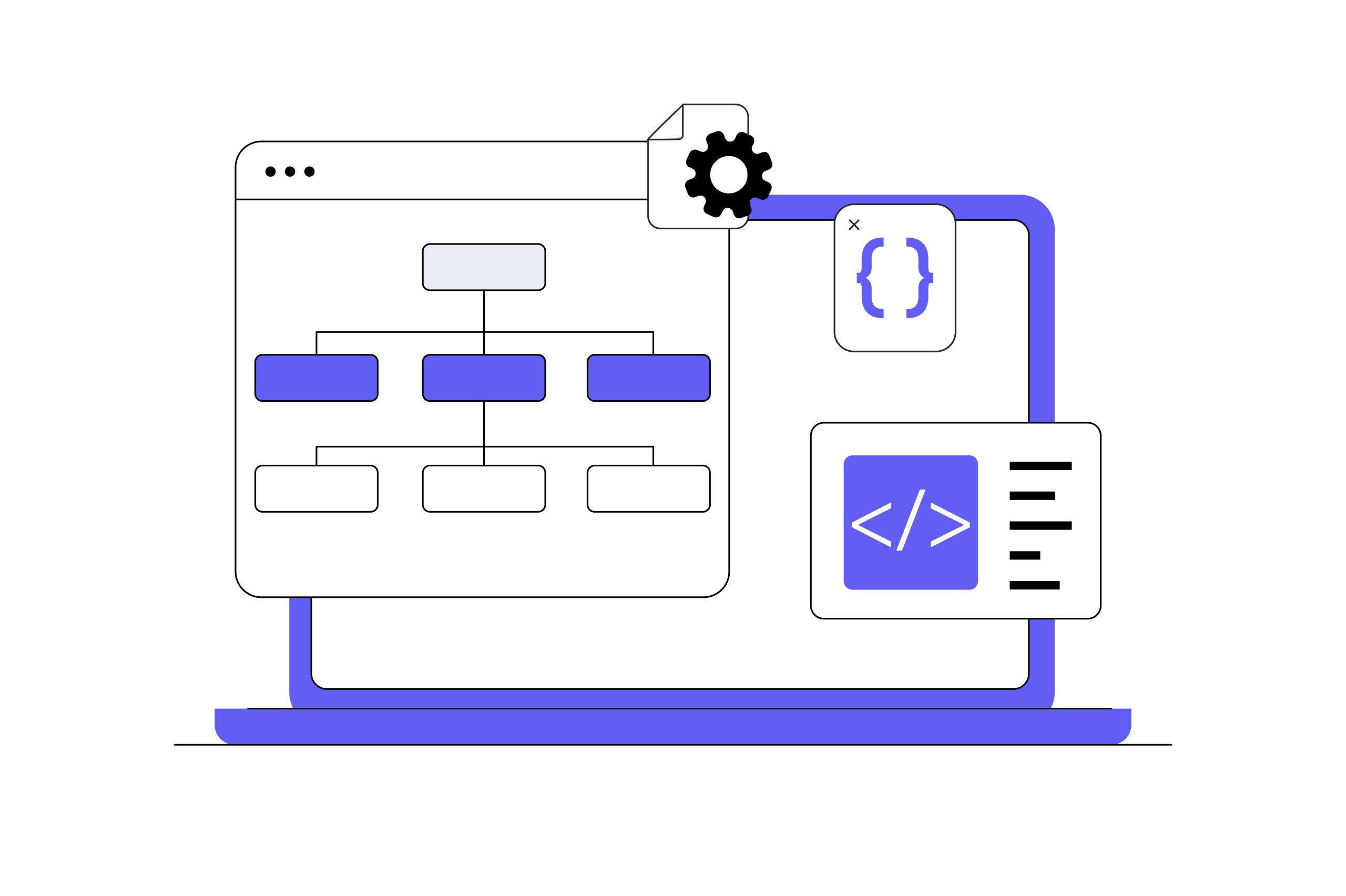
A simplified layer map
| Path | Layered mental model |
|---|---|
| Ollama lane | Application or CLI → Ollama API, model lifecycle, templates, and scheduling → bundled inference component (current GGUF path: pinned llama-server) → selected hardware backend |
| llama.cpp lane | Application, CLI, or Web UI → llama.cpp library or llama-server → directly selected build/backend and runtime controls → hardware |
Simplified mental model—not a complete architecture. Accessible description: Ollama adds model management and service orchestration above bundled inference components, while llama.cpp exposes its library and server closer to hardware controls.
As verified on September 5, 2026, Ollama’s released GGUF path starts a bundled, pinned upstream llama-server beneath its service layer. As shorthand, llama.cpp provides the engine and workshop controls, while Ollama packages those mechanics into a ready-to-drive vehicle with a simpler dashboard. The analogy explains abstraction, not every component or model path.
📝 Note: Bundling a pinned llama-server does not make Ollama identical to upstream llama.cpp. Ollama still supplies its own defaults, templates, scheduling, and public API. Non-GGUF or experimental paths can differ too.
Six Key Terms That Make the Comparison Easier

You do not need a full inference-engineering glossary. These six terms cover the model, memory, and hardware choices ahead.
| Term | Plain-English meaning | Why it affects this choice |
|---|---|---|
| 📦 GGUF | An inference-oriented binary container for model tensors and metadata, central to the llama.cpp ecosystem. GGUF does not itself specify a quantization level. | It is the main portable artifact used directly by llama.cpp and a supported import path for Ollama. |
| 🗜️ Quantization | Representing model tensors at lower precision, generally reducing storage and memory needs. Quality and speed effects vary by method, model, backend, and workload. | The selected quantization can change whether a model fits and performs well, regardless of runtime. |
| 📏 Context length | The active token budget available to the model for instructions, input, history, and output. | Larger active contexts consume more memory, so an advertised maximum is not free capacity. |
| ⚙️ Backend | The hardware-specific compute path, such as CUDA, Metal, HIP/ROCm, or Vulkan. | Runtime and build support for the machine’s best backend can determine whether acceleration works well. |
| 🚀 GPU offloading | Placing eligible model layers or computation on a GPU instead of keeping all work on the CPU. | The amount and placement of offload can change memory use and speed more than the service wrapper does. |
| 🗃️ KV cache | Stored attention state that lets the model reuse earlier context while generating. Its footprint grows with active context and sequences. | Long contexts and concurrent users can consume substantial RAM or VRAM beyond the model file itself. |
The GGUF specification describes the artifact; quantization changes how its tensors are represented. Context and KV cache shape its memory footprint, while backend and offloading determine where the computation runs.
Set the Criteria Before Comparing
Both projects can run open-weight models on user-controlled hardware and expose inference through an API. Those shared abilities do not decide the comparison. Use the same eight questions throughout:

- How much setup friction can you accept before the first useful request?
- Should the service own the model lifecycle, or should you own the exact files and launch choices?
- How much low-level control does the workload genuinely require?
- Which option has the right hardware and backend fit for this machine?
- Does the application need an HTTP service or tighter in-process integration?
- What operational safety must surround the endpoint?
- Who will handle maintenance, updates, and repeatability?
- Will inference run on-device, on a remote private server, or in a vendor cloud?
Performance comparisons require the exact model artifact—the converted file and metadata being run—not merely the same family name. Match the rendered template and active context, then align the backend, offload behavior, and hardware. Use the same software version, batching, and concurrency conditions. With that rubric fixed, start with the most visible difference: daily workflow.
Day-to-Day Workflow: Managed Convenience vs Explicit Control
Initial setup shows the distinction:
- Ollama provides packaged installs across macOS, Windows, and Linux, leading into a service workflow with fewer early choices
- The official llama distribution, package managers, and prebuilt releases provide accessible llama.cpp paths
- Containers and source builds add control when packaged options do not fit
This is no longer “friendly installer versus compile everything,” but llama.cpp still exposes more acquisition, build, and launch decisions.
Once installed, model handling makes the split concrete. Ollama’s named library and pull-on-run behavior streamline acquisition, while managed storage, lifecycle commands, and defaults handle repeated housekeeping. llama.cpp starts from a specific GGUF artifact, although current tooling can fetch and cache compatible Hugging Face models with -hf; its server/router can also discover models and manage loading. Ollama’s advantage is not merely having model-management features, but joining them into one routine.
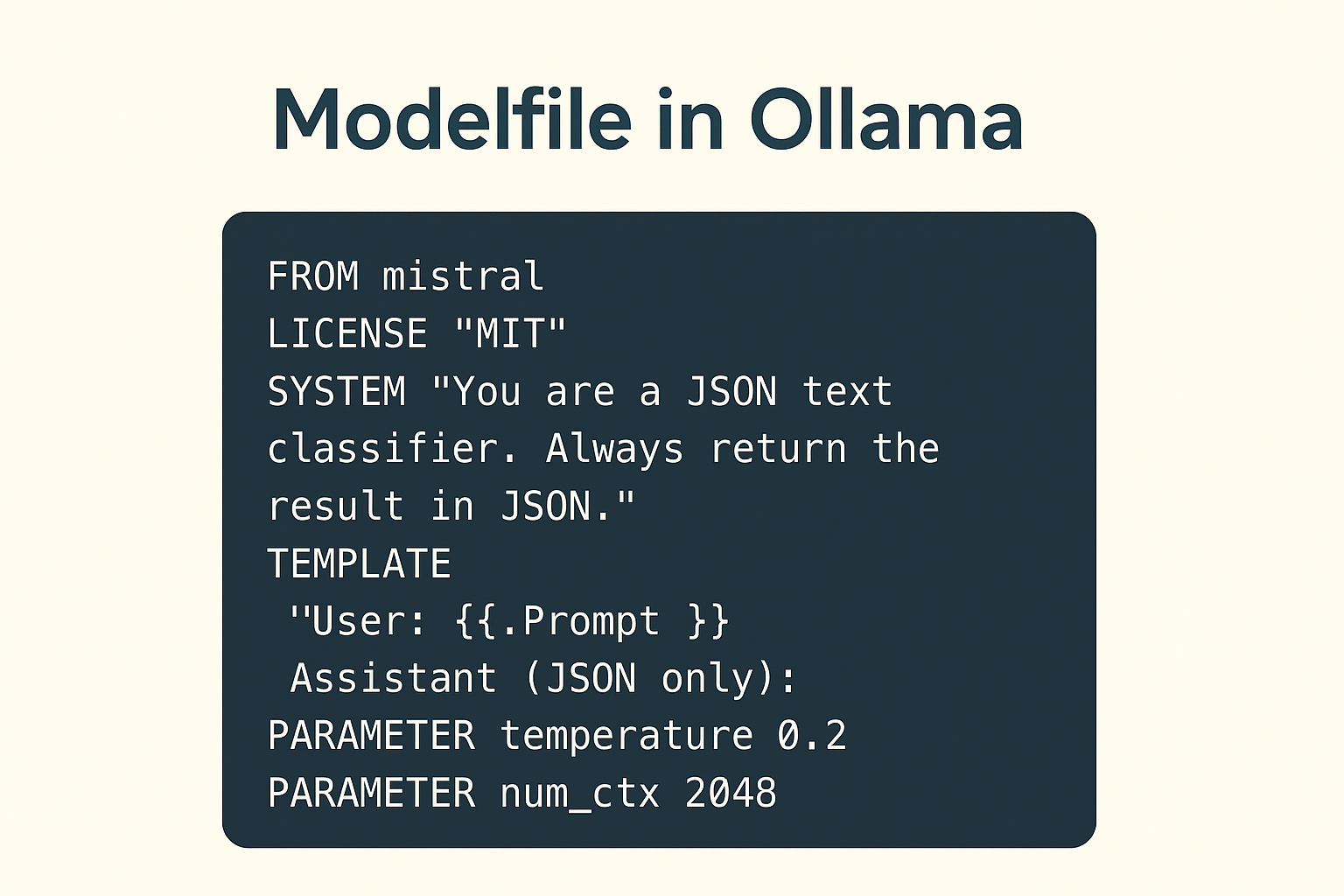
For customization, a Modelfile is Ollama’s declarative recipe. It identifies the base model and parameters, defines prompt or system behavior, and attaches adapters. With llama.cpp, repeatability begins with an exact GGUF and build; the backend and launch configuration pin more of the underlying mechanism.
Ollama is not limited to its model library. Its import workflow accepts supported GGUF files and Safetensors models or adapters, subject to architecture and conversion limits. GGUF remains llama.cpp’s central portable format, but official tooling also handles acquisition and caching.
Updates and repeatability take different forms. Ollama can reproduce an everyday setup through a named model, Modelfile, and managed defaults, although internal revisions may change with an update. llama.cpp lets operators pin the build, artifact, and settings, but they must maintain those details. The tradeoff is administrative load versus visibility: defaults reduce recurring decisions, while explicit settings make specialized behavior easier to inspect.
Performance, Memory, and Hardware: Why There Is No Universal Winner
A runtime can load quickly yet generate slowly, or process a long prompt efficiently yet struggle with concurrent generation. Cold loading, prompt processing, and token generation are separate phases. A single “faster” label hides the measured phase and whether it resembles the real workload.
Even the prompt must match below the visible text. Two services can receive the same message but render different chat templates, role markers, or special tokens. That changes the input tokens and work before generation. Sampling behavior and output length add further differences.
A GGUF file’s size is not its peak memory requirement. Model tensors form the baseline, while the KV cache adds memory for active context and sequences. Compute buffers, adapters, and multimodal projectors add overhead. A draft model or other resident models consume more capacity, and the operating system needs headroom. Longer contexts and more concurrent sequences can therefore expand memory use substantially. If the model cannot fit, solve the sizing problem before comparing runtimes.
llama.cpp directly exposes thread placement, context and batch sizes, and KV-cache types. Device and GPU-layer placement, multi-GPU splitting, and speculative paths also remain operator choices. Ollama automates more, but still exposes active context, parallel requests, model residency, and GPU scheduling. Flash Attention and KV-cache controls remain available through configuration, Modelfiles, or API options. Those controls are useful only when you have a reason to tune them.

Hardware support also resists simple scoring. Ollama packages mainstream CPU and GPU paths, with Metal, CUDA, ROCm, and Vulkan as examples. llama.cpp’s broader build matrix reaches mainstream and unusual targets. A documented backend may not be mature or included in every prebuilt binary. Performance depends on the build, driver, device, and how well the model uses the relevant kernels.
⚠️ Warning: A shared model name or one tokens-per-second screenshot is not a controlled comparison. Different artifacts or templates change the measured work; context, defaults, and warm-up state change the test conditions.
For a fair Ollama vs llama.cpp performance check:
- Use the exact same model artifact or checksum, quantization, adapter, and multimodal projector where applicable.
- Match the chat template and rendered prompt tokens, requested output length, and sampling behavior.
- Match context, KV-cache representation, batch and microbatch settings, parallel slots, and queue or concurrency conditions.
- Match software version and build, backend, drivers, device selection, and GPU offload or split behavior.
- Report cold load, warm prompt processing, and token generation separately.
- Repeat the test under the concurrency and request shape the real application will use.
Multiple GPUs or lower-bit quantization do not guarantee faster inference. Interconnects and memory movement can limit multi-GPU setups, while kernels and request shape can change the result. Choose a configuration that fits with headroom, then measure the phase and pattern your application will use.
APIs and Integration: Service First or Toolkit First?
Ollama is designed primarily as a long-running model service. It provides a native API—its own request and response surface—plus official Python and JavaScript clients. This suits a plugin or internal tool that needs a stable local HTTP endpoint. Ollama acquires and loads the model, leaving the application to send requests.
Ollama documents selected OpenAI-compatible and Anthropic-compatible routes. Current llama-server documents both styles alongside native operational endpoints. These layers let existing clients use a familiar API shape with a different runtime.
A tested OpenAI-style base-URL change can save integration work; it does not settle feature support. Structured output and tool use depend on the route, model, and prompt template. Embeddings or multimodal input may also depend on the build and client. Test these capabilities as part of the application, not as runtime checkboxes.
📝 Note: “Compatible” means selected routes and fields. Test the exact endpoint and request fields first. Then verify streaming behavior and tool-call formats, followed by any image handling, token counts, response fields, and errors your application uses.
llama-server is a serious serving option, not a demo wrapper. Its Web UI provides a browser surface, while parallel decoding and continuous batching support shared serving. Model routing and loading add server-level lifecycle control; compatibility routes and native operational endpoints complete the interface. It can be the better HTTP layer when direct controls matter more than Ollama’s managed lifecycle.
When HTTP is not enough, llama.cpp’s C-style library can embed inference in your process. The application controls initialization and shutdown, while low-level settings stay close to its code. Ollama is normally a separate service. Choose llama.cpp when inference must ship inside the application; choose Ollama when a separate endpoint is preferable.
From a Laptop to an Always-On Private Server
There are three execution boundaries.
- On-device inference runs on the laptop or workstation making the request.
- Remote private self-hosting runs on an organization-controlled server; it can preserve operational control, but requests cross a network and execution is not local to the device.
- Vendor-hosted cloud inference runs on the provider’s infrastructure.
That distinction matters because Ollama’s cloud-tagged models run in its cloud even when a localhost client sends the request. “Using Ollama” does not prove local execution. Strict-local deployments must exclude or disable cloud functionality according to current documentation.

Both projects default to local-only network exposure. Ollama binds locally, and its API has no built-in authentication. llama-server also defaults to loopback—reachable only from the same host—and offers API-key and TLS options. Neither default is a complete public deployment boundary.
⚠️ Warning: Ollama’s local API has no built-in authentication, and placeholder keys accepted by compatibility examples do not secure it. Never expose the raw default endpoint directly to the public internet.
Before making either endpoint remotely reachable, use these controls as the minimum gate:
- A deliberate bind address and private network boundary or VPN.
- Authentication at the server or an authenticated gateway.
- TLS for network transport.
- Firewall, CORS, request-size, concurrency, and resource limits.
- Process supervision, controlled updates, health checks, and monitoring.
- Privacy-aware logging, retention, and data handling that avoid leaking prompts, responses, or credentials.
Size the model and quantization before considering rented GPU capacity. Account for active context and concurrency to estimate VRAM and operating headroom. If a laptop cannot meet the performance or uptime target, rented LLM-capable GPU infrastructure—with AlexHost as one example—becomes an option, not a shortcut around sizing.
Vendor privacy statements are not independent audits. Document where inference runs and which networks requests cross. Record who administers the systems and what storage or logs retain. That record defines the privacy boundary more clearly than the runtime logo.
Which Should You Choose? Recommendations by Use Case
These recommendations describe workload fit, not skill level. Convenience can be an engineering requirement; direct control can be unnecessary overhead. The choice changes when a specific requirement crosses the abstraction boundary.
First local experiment or developer tool: Choose Ollama when fast setup matters and you want models by name. Its ready API gives the tool a stable interface without lifecycle work that does not help the evaluation or integration. Choose llama.cpp instead if you need an unsupported backend, exact build, or unexposed low-level setting.
Reproducible custom inference or embedded application: Choose llama.cpp when the product must own the exact artifact and build. It also controls initialization and runtime settings directly, which matters when inference lives inside the application. Choose Ollama instead if a separate HTTP service and Modelfile-level control fully meet the product’s needs.
Constrained or unusual hardware, or maximum tuning: Start with llama.cpp when its broader backend matrix or explicit placement solves a named requirement. First verify that the model fits. Choose Ollama when it supports the hardware well and direct tuning would add maintenance without useful control or measured improvement.
Team-accessible private service: Ollama is usually the lower-friction starting point for lifecycle and serving, provided the operator adds an authenticated network boundary. Consider llama-server when native API keying, direct serving controls, or backend tuning matter more. Reject either option if the team cannot meet the always-on requirements above.

Use both: Keep Ollama and standalone llama.cpp as separate entry points and lifecycle domains. Applications can select a tested endpoint for routine serving or controlled experiments, but cannot assume identical API behavior. Each runtime may keep its own model storage, port, and process; if both hold models, they can compete for RAM or VRAM. Ollama does not use your separate llama.cpp service.
The matrix below recaps those choices. Do not count rows as points: one hard requirement can outweigh every convenience elsewhere.
| Decision area | Ollama | llama.cpp |
|---|---|---|
| 🚀 Quickest start | Integrated installation, model, and service path | More acquisition, build, and launch choices remain visible |
| 🔄 Model lifecycle | Named pulls, managed storage, Modelfiles, residency, and scheduling | Direct GGUF or Hugging Face cache plus router, preset, and loading controls; less opinionated end-to-end |
| 🎛️ Granular tuning | Automated defaults with selected configuration and API controls | Broader direct control over builds, devices, placement, caches, and batches |
| 🧩 In-process embedding | Normally consumed as a separate service | C-style library is the stronger direct fit |
| 🌐 API service | Native API plus scoped compatibility layers | llama-server with scoped compatibility and native operational routes |
| ⚙️ Backend flexibility | Curated packaged support | Broader build-time backend matrix, with build and maturity caveats |
| 🛠️ Operational responsibility | Integrated model/service lifecycle; external authentication required beyond local use | More explicit server ownership and native key/TLS options; hardening still required |
| 🎯 Strongest-fit workload | Repeatable everyday local or private model service | Embedded, experimental, hardware-specific, or deeply tuned inference |
Bottom Line

The two paths from the opening looked contradictory because they assign ownership differently. Choose Ollama when the integrated workflow is itself the feature. Choose llama.cpp when direct control over inference is the feature.
If you are uncertain, confirm that the model and quantization fit the hardware. Check the intended context’s memory cost, then start with Ollama. Move to—or add—standalone llama.cpp only for a concrete low-level requirement: a specific backend or build, in-process embedding, or finer placement and tuning.