Open Ticket
 +373 79 600002
 Telegram Live Chat
 F.A.Q
 English
 Русский
 Română
 Deutsch
 Français
 Türkçe
 Español
 Português
 Українська
 български
 Polski
 Indonesia
 中文 (中国)


 on All Hosting Services


Best RTX 4070 Ti SUPER Server Use Cases in 2026
Your onboarding documents could become source-linked answers. An owned product photo could become campaign-background concepts. An existing 3D scene could become finished product visuals—all without keeping a laptop occupied. Those are three practical RTX 4070 Ti SUPER server use cases: focused jobs with recognizable outputs.
The eight options below are alternatives, not applications to load together. Here, “best” means useful outcomes with a realistic software path, not a benchmark ranking. Compact image-and-text models and editing workflows expand the options in 2026; encoding and rendering remain useful too. Choose one focused service or queued worker that can keep running independently of your laptop.
The useful boundary: 16 GB of fast working space
The RTX 4070 Ti SUPER has 16 GB of VRAM—the GPU’s working memory. That is its workbench for models and scenes, so the projects below use smaller models and bounded jobs. Compatible NVIDIA software handles AI and rendering; dedicated video-encoding hardware supports media work. These are documentation-backed starting points, not deployment benchmarks. Each assumes one suitably configured card.
1. Ask your own documents, not the whole internet
A new teammate asks which onboarding checklist applies to their role. Instead of searching folders, they receive a draft answer linked to approved onboarding files or runbooks. With the model self-hosted remotely and team access controlled, this can become a private knowledge service.
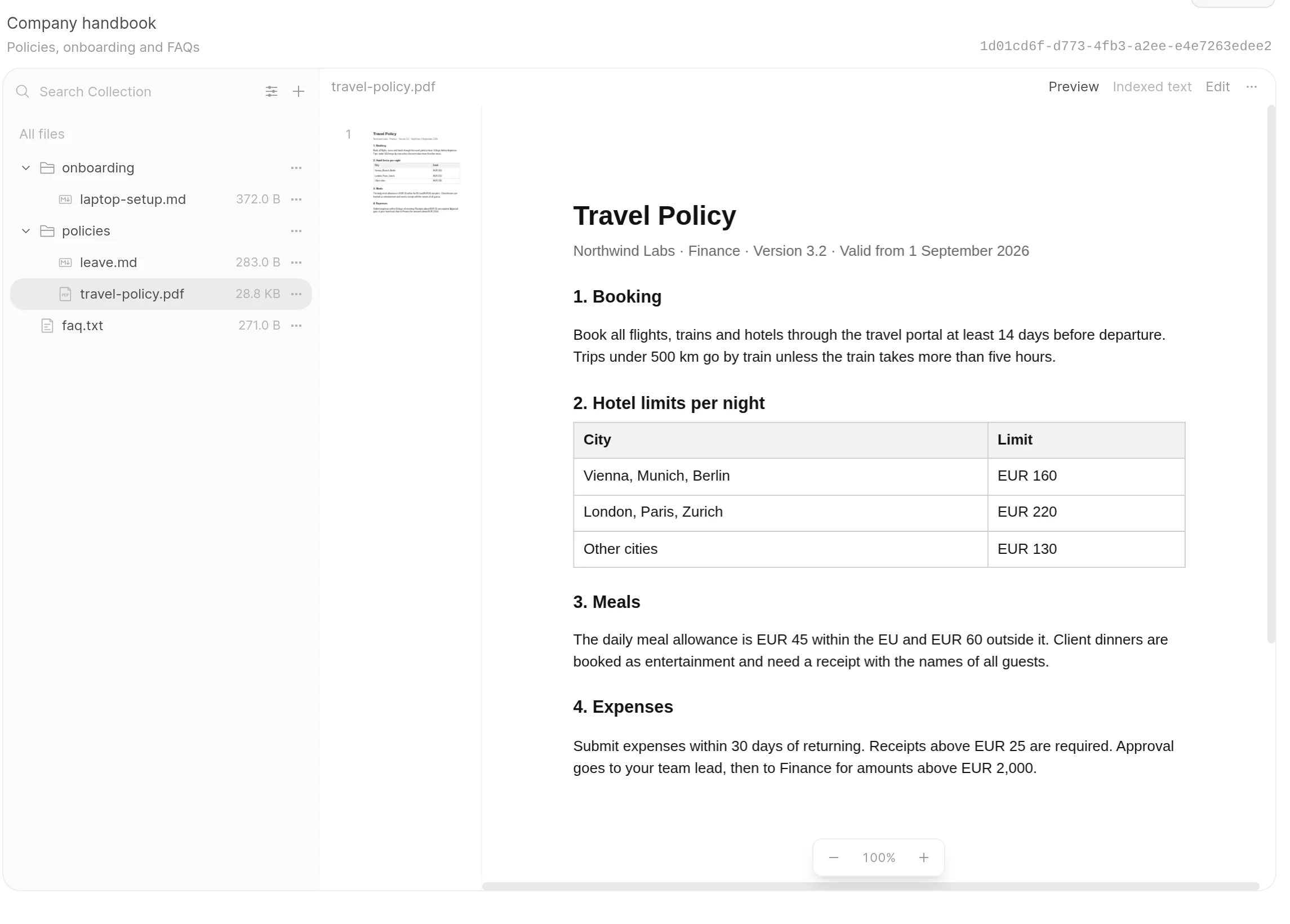
Retrieval-augmented generation, or RAG, works like an open-book assistant: software finds relevant passages and gives them to the model before it answers. Embeddings make passages searchable by meaning rather than exact wording alone. Uploading documents does not retrain the model; the answer depends on the material retrieved for that question.
📝 Note: Private inference means the model runs on the remote server, not that every component is private. Check where embeddings and document parsing run. Logs and external fallbacks also need review. Remote hosting remains a trust relationship with the provider.
The GPU chiefly accelerates inference: using an already-trained model to generate the answer. A quantized model stores its numbers with fewer bits, saving memory with possible quality trade-offs. The question and retrieved passages form part of its context—the information it keeps in view for a request. Passage matching can use a small self-hosted component; storing and searching files do not necessarily require another large GPU service.
- Starter project: One onboarding collection and known-answer questions. Check answers against cited passages; include an unanswered question to see whether the assistant acknowledges missing information.
- Example stack: Open WebUI for documents and retrieval; self-hosted embeddings for passage matching; Ollama running quantized Qwen3.5-4B for server-side answers.
- Main limit: Retrieval quality and permissions determine what reaches the model. Citations help you check answers; they do not certify truth.
2. Give a team its own image-generation and editing studio
A small shop owns a product photo and needs campaign-background concepts: a studio backdrop, a seasonal setting, a different color palette. The output is a set of drafts for someone to select and refine—a more manageable first goal than replacing product photography.
The visual workflow connects processing stations, called nodes, that load a reference image, apply instructions, and save results. The GPU runs the image model to turn the photo and prompt into a variation. Saving that workflow gives the team a repeatable starting point for the next set of concepts.

Teammates can submit jobs to a shared server queue instead of rebuilding the setup on individual desktops. The proposed FLUX.2 [klein] 4B model uses Apache-2.0, permitting commercial use under its terms. That license applies to this variant, not every FLUX model; rights to the images still matter.
- Starter project: Create a few background variations for one owned product image. Compare shape, packaging text, logos, and brand consistency with the original before use.
- Example stack: ComfyUI for the saved visual workflow and job queue; distilled FLUX.2 [klein] 4B for generation and reference-image editing on the GPU.
- Main limit: A convincing image can still change the product or its text. Treat outputs as concepts requiring accuracy and rights review.
3. Turn recordings into transcripts, subtitles, and searchable knowledge
Your webinar or a meeting recorded with appropriate consent may contain information that is hard to find later. A transcription worker turns it into timestamped text and subtitle files. Organize the reviewed transcripts, and ordinary text search can help you locate a topic without replaying each recording.

The speech model first produces transcript segments with timestamps. An export wrapper—application code around the recognition library—then saves them as readable text and SRT or VTT subtitle files. Those timestamps connect the words back to the recording and give the subtitle exporter its timing information.
An upload folder or queue lets the server work through a recording backlog unattended, with the GPU handling speech recognition. Optional summaries require another model, preferably scheduled separately on one card. Speaker labels need a separate stage to distinguish speakers; transcription alone does not provide them.
- Starter project: Process several permission-cleared recordings into transcripts and subtitles. Compare samples with the audio, checking names, technical vocabulary, and subtitle timing.
- Example stack: faster-whisper with large-v3 and suitable reduced-precision GPU settings; an upload queue; an export wrapper for subtitle files and searchable transcript storage.
- Main limit: Audio quality controls the correction workload. Noise, accents, unfamiliar terms, and overlapping speakers can leave errors that need human review.
4. Connect a private coding assistant to your editor
Select a function in your editor and ask for tests, an explanation, or a small refactor. You get draft code beside the function you are working on. Your editor and working files can stay on the laptop while selected code travels to the server for inference.
The editor sends the selected code and your question to a remote model endpoint, then displays the response in the development workspace. Including the function’s intended behavior helps make the request concrete. For a test-writing task, the result gives you a draft to compare with that behavior rather than a blank test file.
The GPU handles response generation, while the server provides a reusable endpoint for editor requests. Keep execution and risky edits under your control, with restricted permissions. Editor chat is the starting workflow here; responsive inline autocomplete has different model and latency requirements.
- Starter project: Draft tests for one module. Inspect them, run them in a controlled development environment, and check intended behavior—not merely whether they compile.
- Example stack: Continue for editor chat and proposed edits; a controlled Ollama endpoint running quantized Qwen3.5-4B on the server for response generation.
- Main limit: Small-model quality, limited code context, and network latency constrain help. This is not a substitute for the largest commercial coding systems.
5. Turn invoices and scans into structured records
Invoice images can become proposed vendor, date, invoice number, and total fields in a review spreadsheet. Linking each row to its original document makes comparison straightforward. The practical payoff is a consistent set of records that someone can check and pass into the next business process.

A vision-language model accepts images as well as text. Prepare one page image at a time, then ask it for the fields you need. This makes the GPU useful for visual interpretation rather than assuming the model can parse every PDF type. Clean, text-based PDFs may need only ordinary parsing, with no GPU involved.
After extraction, ordinary application code checks that required values are present and dates and numbers use the expected formats. It can also check arithmetic where available and look for duplicate invoice identifiers. Missing or uncertain fields stay flagged. The server brings batch results and their sources together for the review handoff:
Invoice image → GPU extraction
                      ↓
    +------------------------------------+
    | Ordinary validation + human review |
    +------------------------------------+
                      ↓
         Approved spreadsheet/record
Extracted fields are proposals until ordinary checks and human review are complete; only then should they become approved records.
- Starter project: Convert one invoice family into a review spreadsheet with source references. Compare each selected field with the original before accepting the row.
- Example stack: Page-image preparation; Ollama with Qwen3.5-4B for visual extraction; ordinary validation/export code and a review step to produce approved spreadsheet records with source references.
- Main limit: Plausible values can be wrong. Require human approval before accounting entry or payment.
6. Make uploaded video ready for different viewers
A lesson or product demonstration may need several delivery versions, not new footage. Transcoding converts existing encoded video. A suitable master can become 1080p and 720p copies for different screens and connections. Reducing resolution can help delivery; increasing it cannot recover missing detail.

NVENC is NVIDIA’s specialist video encoder, separate from language-model computation. A codec is the technology used to encode and decode video. H.264 is a broadly compatible starting choice; AV1 is another option when your target playback devices support it. Decoding and scaling may involve other GPU hardware or the CPU.
The server can apply consistent conversion settings to queued uploads and store delivery copies separately from the master. Media hardware handles supported encoding, but settings still shape the result. Choose hardware encoding for throughput, not guaranteed quality gains over CPU encoding.
- Starter project: Convert one owned recording into 1080p and 720p versions. Check intended-device playback, sound synchronization, readable content, and file sizes.
- Example stack: FFmpeg for conversion with NVIDIA-supported encoding; a simple upload queue to schedule jobs and storage for source files and finished delivery versions.
- Main limit: Capacity depends on codecs, settings, driver session restrictions, disk activity, and transfer bandwidth—not GPU memory alone.
7. Send Blender renders to a remote GPU worker
A product designer can keep modeling locally while a server produces final stills or turntable frames. Rendering means computing final images from an existing 3D scene, not inventing an image from a text prompt. You supply the scene, materials, lighting, and camera; the worker calculates the finished images.
The rendering backend connects the scene calculations to RTX hardware acceleration. You can run background rendering without an interactive remote desktop, letting the prepared job produce output files on the server. Select GPU rendering separately; background mode alone does not choose the rendering device.
The handoff needs compatible Blender features and all required assets: pack textures with the project or ensure their paths resolve on the server. Upload and preparation time can outweigh the benefit for tiny jobs. Supported memory fallback may help larger scenes fit, with a performance trade-off.
- Starter project: Render one modest product scene into final stills or a short turntable. Check a representative frame’s textures, materials, lighting, and framing before queuing everything.
- Example stack: Blender Cycles for scene rendering; NVIDIA OptiX for GPU acceleration; background execution to produce output files without requiring an interactive remote desktop.
- Main limit: Scene and texture memory govern fit. Multiple cards do not ordinarily combine scene memory on this hardware.
8. Adapt a small model to one repeatable task
More advanced. You could adapt a small model to classify support requests into existing categories: billing, account access, or technical issues. Think of coaching an employee on a narrow procedure, not educating one from scratch. The deliverable is an adapter plus evaluation evidence—not unattended ticket actions.

QLoRA keeps a quantized base model largely fixed while training small added components called adapters. This is not foundation-model training or full-weight fine-tuning. The GPU performs training; a server provides an isolated, repeatable job and stores its artifacts. Schedule other one-card workloads separately.
Start with a supported small text-model training recipe rather than the earlier Ollama inference package. According to Unsloth’s requirements, supported models around three to eight billion parameters are starting candidates. Short sequences and small batches help control memory use, but not every model or recipe will fit in 16 GB. Try prompts first; use retrieval for changing facts.
- Starter project: Compare the original model, a strong-prompt version, and an adapted version on the same held-out requests—examples excluded from training. Inspect category choices and failures.
- Example stack: Unsloth’s documented training route using the older Qwen2.5-7B-Instruct text model in a compatible 4-bit recipe; labeled support examples and evaluation code for category predictions.
- Main limit: Data quality and evaluation determine whether adaptation helped. Finishing training does not demonstrate improvement.
What your project needs beyond the GPU
Once you have a project in mind, size the surrounding server. If VRAM is the workbench, system RAM is nearby staging space for the application and data preparation. Choose CPU capacity for parsing and other surrounding application work. NVMe SSD storage is the warehouse for active models and assets.
More storage does not enlarge GPU memory; moving work into system RAM can help supported applications fit, with performance overhead. Check your chosen software’s hardware requirements alongside these resources.
AlexHost lists single- and dual-card configurations, including a single RTX 4070 Ti SUPER with 16 GB GPU memory, 64 GB RAM, and 1 TB NVMe. This is one example of pairing the card with resources for the surrounding application.
When the workload grows, distinguish a longer queue from a job that no longer fits. Another GPU can handle independent jobs. A larger model or scene may instead need more per-card memory. Some model-serving applications can split a job across cards, with communication overhead; independent workers are the simpler arrangement:
+-------------------+
| GPU 1: 16 GB VRAM | → Knowledge assistant
+-------------------+

+-------------------+
| GPU 2: 16 GB VRAM | → Queued image jobs
+-------------------+
Leave room beyond the model’s weights for context and temporary calculations. Higher image resolution and simultaneous requests can increase memory needs too. Ollama’s memory guidance explains why download size is not peak memory use. On one card, queued jobs or separate schedules can keep competing models from exhausting memory.
📝 Note:Conceptual assignments, not a promised provider layout: two separate 16 GB GPUs provide 32 GB aggregate, not one automatic 32 GB allocation. Supported model splitting is a separate software feature, not automatic memory pooling.
Recording libraries need storage and backups, while frequent transfers make bandwidth part of the sizing decision. For an exposed service, use authentication and restrict access to intended users. A maintenance owner must keep it updated and check external processing paths. That owner also needs to decide how long logs and backups are retained.
Recurring work can justify dedicated resources; sporadic use may fit an API or occasional rental better. Weigh the effort of operating the application alongside rental costs.
Choose one useful first project
Match the output you need to a small project you can check:
| Your goal | Starting project | Main constraint |
|---|---|---|
| 📚 Answers from internal documents | One curated onboarding collection | Retrieval quality and permissions |
| 🎨 Campaign image concepts | Variations of one owned product photo | Product accuracy and rights |
| 🎙️Readable, searchable recordings | Reviewed transcript and subtitles | Audio quality and correction |
| 💻 Help inside your editor | Draft tests for one module | Context and code review |
| 🧾 Structured invoice records | One invoice family into a review spreadsheet | Field validation and approval |
| 🎬 Delivery-ready video | One recording in two resolutions | Codec support and pipeline capacity |
| 🧊 Finished 3D visuals | A small product render job | Scene memory and asset transfer |
| 🧠 Consistent model behavior—advanced | An adapter for support categories | Training data and held-out evaluation |
For teams with documents, a knowledge assistant offers an approachable starting point. Visual creators can start with image editing, while people with recording libraries can start with transcription. Choose one deliverable using inputs you own or have permission to use. Make success concrete: an answer backed by the right passages, or subtitles that follow the recording.
If remote hosting suits your choice, AlexHost’s GPU server offering gives you configurations to compare against the project you have selected. Then build the smallest version that produces a useful result. Your first milestone is a finished output you can use—not a server full of half-started applications.