Open Ticket
  +373 79 600002
  Telegram Live Chat
  F.A.Q
F.A.Q  English
 Русский
  Română
  Deutsch
  Français
  Türkçe
  Español
  Português
  Українська
  български
  Polski
  Indonesia
  中文 (中国)






































































































































 on All Hosting Services






LiteSpeed Hosting and PHP Version Management: A Complete Technical Guide for AlexHost Users
Choosing the correct PHP version for your hosting environment is one of the most consequential decisions in web application deployment. The wrong version can silently degrade performance, introduce security vulnerabilities, or break framework compatibility entirely. AlexHost's LiteSpeed-powered shared hosting supports PHP 7.3, 7.4, 8.0, and 8.1 simultaneously, allowing you to assign different PHP versions per domain through cPanel's MultiPHP Manager — without touching server configuration files or opening a support ticket.
This guide covers what each PHP version actually delivers at the engine level, how to switch versions correctly on AlexHost infrastructure, and how to avoid the common pitfalls that cause application failures after a version change.
Why PHP Version Selection Matters More Than Most Developers Realize
PHP is not a monolithic runtime. Each major and minor release changes the Zend Engine behavior, deprecates functions, alters type coercion rules, and modifies how the OPcache and JIT compiler interact with your code. Running PHP 7.3 code on PHP 8.1 without testing is not a safe upgrade — it is a gamble with your production environment.
LiteSpeed Web Server handles PHP execution through LSAPI (LiteSpeed Server Application Programming Interface), which is architecturally distinct from Apache's mod_php or FastCGI. LSAPI maintains persistent PHP worker processes, eliminating the per-request process spawning overhead that burdens traditional setups. The result is measurably lower time-to-first-byte (TTFB) and significantly reduced CPU cycles per request — particularly important for PHP-heavy applications like WordPress, Magento, or Laravel.
When you combine LiteSpeed's LSAPI with cPanel's MultiPHP Manager, you get per-domain PHP version isolation at the process level, not just at the configuration level. This is a critical distinction for agencies or developers hosting multiple client sites on a single Shared Web Hosting account.
PHP Version Comparison: Feature and Security Matrix
| Feature / Attribute | PHP 7.3 | PHP 7.4 | PHP 8.0 | PHP 8.1 |
|---|---|---|---|---|
| Official Security Support | Ended Dec 2021 | Ended Nov 2022 | Ended Nov 2023 | Ended Nov 2024 |
| JIT Compiler | No | No | Yes (experimental) | Yes (improved) |
| Typed Properties | No | Yes | Yes | Yes |
| Arrow Functions | No | Yes | Yes | Yes |
| Union Types | No | No | Yes | Yes |
| Named Arguments | No | No | Yes | Yes |
| Match Expression | No | No | Yes | Yes |
| Attributes (Annotations) | No | No | Yes | Yes |
| Enumerations (Enums) | No | No | No | Yes |
| Fibers (Coroutines) | No | No | No | Yes |
| Readonly Properties | No | No | No | Yes |
| Intersection Types | No | No | No | Yes |
| Nullsafe Operator | No | No | Yes | Yes |
| OPcache Preloading | No | Yes | Yes | Yes |
| Relative Performance vs 7.3 | Baseline | +~5-10% | +~15-20% | +~20-25% |
Key takeaway from this table: PHP 7.3 and 7.4 are past their official end-of-life dates. They should only be used when a legacy application has hard dependencies that cannot be resolved — not as a default choice for new deployments.
PHP 7.3: Legacy Stability with Known Limitations
PHP 7.3 was a maintenance-focused release that introduced array_key_first(), array_key_last(), flexible heredoc/nowdoc syntax, and the is_countable() function. It represented a stable platform for applications that had been running on PHP 5.x and needed a migration path without aggressive refactoring.
Critical operational reality: PHP 7.3 reached end-of-life in December 2021. It receives no security patches from the PHP project. Running it in production means any newly discovered vulnerability in the Zend Engine or core extensions will remain unpatched. The only legitimate reason to use PHP 7.3 on AlexHost today is to maintain a legacy application while a migration to PHP 8.x is actively in progress.
Common use case: Older Joomla 3.x installations, legacy CodeIgniter 3 applications, or custom PHP 5.6-era codebases that have not been updated to use modern type declarations.
PHP 7.4: The Last of the 7.x Line — Useful for Transitional Deployments
PHP 7.4 was the final release in the PHP 7 branch and introduced several features that made code significantly more maintainable and performant without requiring the breaking changes that came with PHP 8.0.
Typed class properties allow you to enforce type constraints at the class level:
class User {
    public int $id;
    public string $email;
    public ?DateTime $lastLogin;
}
This eliminates an entire category of runtime errors that previously only surfaced under specific execution paths.
Arrow functions reduce the verbosity of short closures, particularly useful in array operations:
$multiplied = array_map(fn($n) => $n * 2, $numbers);OPcache preloading (introduced in 7.4) is architecturally significant: it allows PHP to load and compile a set of files into shared memory at server startup, making those files available to all worker processes without repeated compilation. On LiteSpeed with LSAPI, this compounds the performance benefit because persistent workers already avoid process-spawn overhead.
PHP 7.4 reached end-of-life in November 2022. It is appropriate for WordPress installations running older plugins with known PHP 8.x incompatibilities, or for Drupal 7 deployments still awaiting migration.



PHP 8.0: The Architectural Inflection Point
PHP 8.0 was not an incremental release. It introduced changes that fundamentally altered how PHP code is written, executed, and reasoned about. Several long-standing behaviors were changed or removed, making it a breaking upgrade for codebases that relied on loose type coercion or deprecated functions.
Just-In-Time Compilation
The JIT compiler in PHP 8.0 compiles hot code paths to native machine code at runtime, bypassing repeated interpretation. In CPU-bound workloads — mathematical computations, image processing, data transformation pipelines — JIT can deliver substantial speedups. However, for typical I/O-bound web applications (database queries, file reads, API calls), the JIT benefit is often marginal because the bottleneck is not CPU execution but waiting for external resources.
Understanding this distinction prevents the common mistake of expecting JIT to automatically speed up a WordPress site. It will not — unless that site is doing significant in-process computation.
Union Types and Named Arguments
Union types allow a function parameter or return value to accept multiple types explicitly:
function processInput(int|string $input): int|false {
    // ...
}
Named arguments decouple argument order from function signatures, dramatically improving readability in functions with multiple optional parameters:
array_slice(array: $data, offset: 2, length: 5, preserve_keys: true);The Match Expression
The match expression replaces switch with strict type comparison, no fall-through behavior, and expression-based returns:
$status = match($code) {
    200, 201 => 'success',
    404 => 'not found',
    500 => 'server error',
    default => 'unknown',
};
Unlike switch, match throws an UnhandledMatchError if no arm matches and no default is provided — making silent failures impossible.
Attributes (Structured Metadata)
PHP 8.0 Attributes replace docblock annotations used by frameworks like Doctrine and Symfony. They are parsed by the engine itself, not by userland regex:
#[Route('/api/users', methods: ['GET'])]
public function listUsers(): Response { ... }
This has significant implications for framework performance and IDE tooling accuracy.
PHP 8.1: Production-Grade Modern PHP
PHP 8.1 is the version that most new projects should target as of this writing. It builds on PHP 8.0's foundation and adds features that address long-standing gaps in the language's type system and concurrency model.
Enumerations
Enums solve the "magic constant" problem that plagued PHP codebases for decades:
enum Status: string {
    case Active = 'active';
    case Inactive = 'inactive';
    case Pending = 'pending';
}
Backed enums can be stored in databases and serialized cleanly. Pure enums provide type-safe state representation without the fragility of class constants or integer flags.
Fibers: Cooperative Multitasking
Fibers introduce a low-level concurrency primitive to PHP. Unlike threads, Fibers are cooperative — they yield control explicitly. This is the foundation that async PHP frameworks (like ReactPHP and Amp) use to implement non-blocking I/O without requiring extensions like Swoole:
$fiber = new Fiber(function(): void {
    $value = Fiber::suspend('first suspension');
    echo "Resumed with: " . $value;
});

$value = $fiber->start();
$fiber->resume('hello');
For applications running on VPS Hosting with full control over the PHP runtime, Fibers open the door to building event-loop-based applications in pure PHP.
Readonly Properties
Readonly properties enforce immutability after initialization, which is essential for value objects and domain entities in DDD (Domain-Driven Design) architectures:
class OrderId {
    public function __construct(
        public readonly string $value
    ) {}
}
Once set in the constructor, $value cannot be modified. Any attempt throws an Error. This eliminates an entire class of defensive programming boilerplate.
Intersection Types
Where union types say "this OR that," intersection types say "this AND that" — requiring a value to implement multiple interfaces simultaneously:
function processEntity(Serializable&Countable $entity): void { ... }This is particularly valuable in service container and middleware pipeline architectures.
How to Change PHP Versions on AlexHost LiteSpeed Hosting via cPanel
AlexHost's VPS with cPanel and shared hosting environments expose PHP version management through cPanel's MultiPHP Manager. Here is the exact procedure:
Step 1: Access Your cPanel Dashboard
Log in to your AlexHost account and navigate to the Login Details section to retrieve your cPanel credentials. Open cPanel directly via the provided URL (typically yourdomain.com:2083 or the direct IP with port).
Step 2: Navigate to MultiPHP Manager
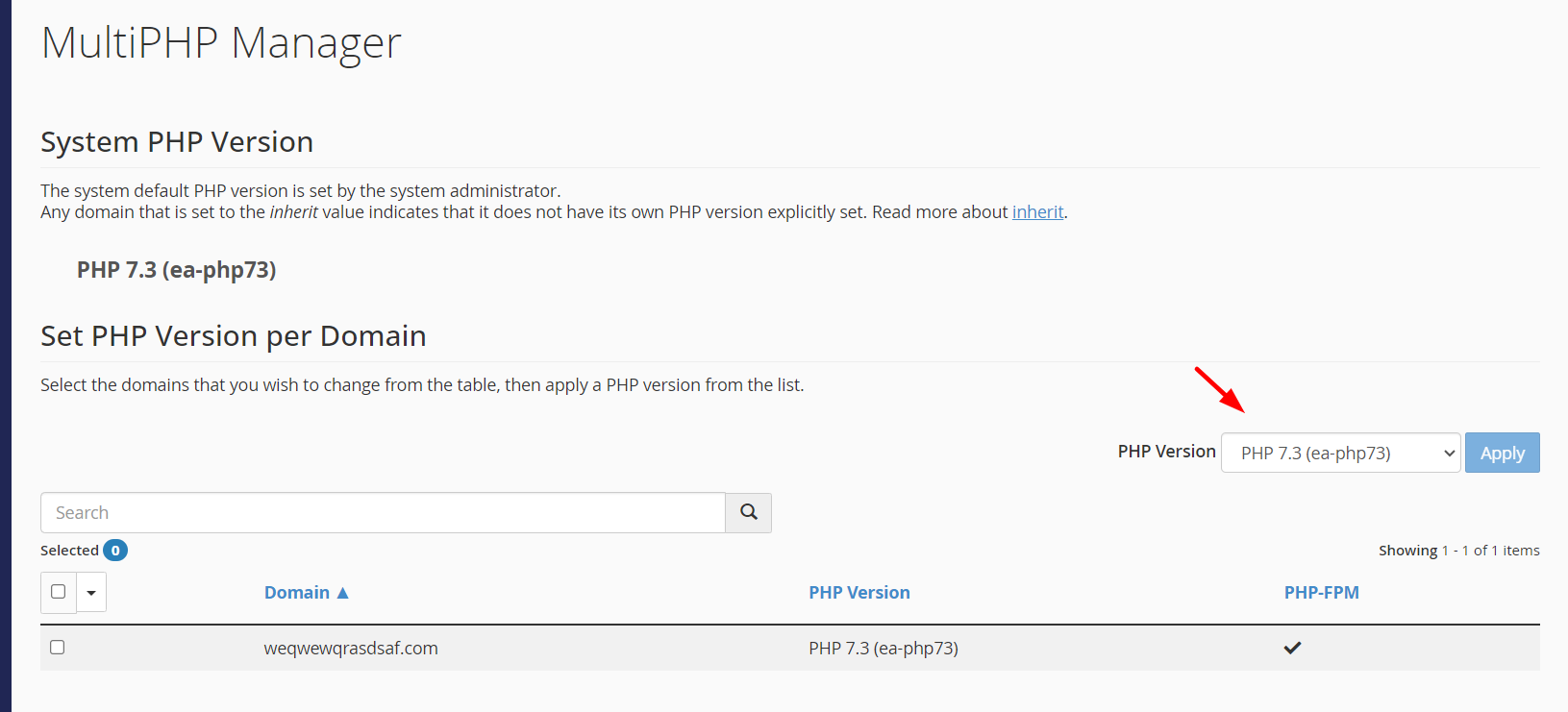
Inside cPanel, locate the Software section. Click MultiPHP Manager. This interface lists all domains and subdomains associated with your account, each with its currently assigned PHP version displayed.
Step 3: Select the Target Domain and PHP Version
Check the checkbox next to the domain or subdomain you want to modify. Use the PHP Version dropdown to select from the available versions — PHP 7.3, 7.4, 8.0, or 8.1 depending on your hosting plan configuration. Click Apply.
Step 4: Verify the Change
After applying, the change takes effect immediately for new requests. Verify by creating a temporary phpinfo.php file in the domain's document root:
<?php phpinfo(); ?>Confirm the PHP version in the output, then delete this file immediately — leaving phpinfo() exposed in production is a security vulnerability that reveals your server configuration to attackers.
Step 5: Test Application Functionality
Do not assume a PHP version change is safe without testing. Check your application's error log (/home/username/logs/ or via cPanel's Errors tool) for deprecation notices, fatal errors, or undefined function calls that indicate incompatibility.
Per-Directory PHP Version Override via .htaccess
For granular control — for example, running a legacy subdirectory on PHP 7.4 while the main site runs PHP 8.1 — you can override the PHP version at the directory level using .htaccess:
<FilesMatch ".php$">
    SetHandler application/x-httpd-ea-php81
</FilesMatch>
The handler name format is application/x-httpd-ea-phpXX where XX corresponds to the version number without the decimal point. This is an EasyApache 4 convention used in cPanel environments.
PHP Version Selection Decision Matrix
| Scenario | Recommended PHP Version | Rationale |
|---|---|---|
| New Laravel 10+ or Symfony 6+ project | PHP 8.1 | Requires PHP 8.1 minimum; full feature support |
| WordPress 6.x (all plugins updated) | PHP 8.1 | Official recommendation; performance gains |
| WordPress with legacy plugins (pre-2022) | PHP 7.4 or 8.0 | Test compatibility before upgrading |
| Magento 2.4.6+ | PHP 8.1 | Official support matrix requires 8.1 |
| Drupal 10 | PHP 8.1 | Minimum requirement |
| Legacy Joomla 3.x | PHP 7.3 or 7.4 | Joomla 3.x not fully compatible with PHP 8.x |
| Custom legacy application (pre-2018) | PHP 7.3 | Migrate as soon as feasible |
| New API microservice or CLI tool | PHP 8.1 | Enums, Fibers, readonly properties available |
Security Implications of Running End-of-Life PHP Versions
This point deserves explicit emphasis. PHP versions past their end-of-life date do not receive security patches from the PHP project. This means:
- CVEs discovered after EOL are not patched in the affected version branch.
- Shared hosting environments are particularly exposed because a compromised PHP process can potentially affect neighboring accounts depending on isolation configuration.
- PCI DSS compliance explicitly prohibits running software past its vendor-supported end-of-life date. If you process payments, running PHP 7.3 or 7.4 is a compliance violation.
- Web Application Firewalls (WAF) can mitigate some exposure, but they cannot patch engine-level vulnerabilities.
If you need full control over your PHP environment, security patching cadence, and the ability to compile custom PHP extensions, a Dedicated Server gives you the isolation and administrative access that shared environments cannot provide.
LiteSpeed-Specific PHP Performance Considerations
Several LiteSpeed behaviors interact with PHP version selection in ways that are not obvious:
LiteSpeed Cache (LSCache): The LSCache plugin for WordPress operates at the web server level, not the PHP level. However, PHP 8.x's improved OPcache hit rates mean that cache misses are served faster, reducing the performance penalty of uncached requests.
LSAPI worker persistence: LiteSpeed keeps PHP workers alive between requests. This means that PHP 8.1's JIT compiler has more opportunity to warm up and optimize hot code paths compared to a traditional CGI setup where each request starts a cold process.
PHP-FPM vs. LSAPI: On VPS Control Panels where you configure the stack yourself, you may choose between PHP-FPM and LSAPI. LSAPI consistently outperforms PHP-FPM in benchmarks for LiteSpeed environments because it uses a purpose-built communication protocol rather than FastCGI's generic interface.
Memory limits and worker count: PHP 8.x has a slightly higher baseline memory footprint than PHP 7.x due to additional runtime structures for JIT and the type system. If you are running a memory-constrained environment, monitor memory_limit settings after upgrading.
Practical Key-Takeaway Checklist
Before changing or selecting a PHP version on your AlexHost LiteSpeed hosting, work through this checklist:
- Check your application's official PHP compatibility matrix — do not guess. Laravel, WordPress, Magento, and Drupal all publish minimum and maximum supported PHP versions.
- Audit installed plugins and extensions — third-party code is the most common source of PHP 8.x incompatibility. Run
composer check-platform-reqsif using Composer. - Stage the change first — use a subdomain or staging environment to test the PHP version change before applying it to production.
- Review error logs immediately after switching — look for
E_DEPRECATED,E_NOTICE, andE_FATALentries that indicate broken compatibility. - Delete any
phpinfo()files created during verification. - Do not run EOL PHP versions in production unless you have a documented, time-bound migration plan and compensating security controls.
- Use MultiPHP INI Editor (also in cPanel's Software section) to tune per-domain PHP directives like
memory_limit,upload_max_filesize, andmax_execution_timeafter a version change — defaults differ between versions. - If your application requires PHP 8.2 or 8.3, consider upgrading to a VPS plan where you control the full software stack and can install any PHP version via repositories like Remi or ondrej/php.
Frequently Asked Questions
Can I run different PHP versions on different domains within the same AlexHost shared hosting account?
Yes. cPanel's MultiPHP Manager applies PHP version settings at the per-domain level. Each domain or subdomain in your account can run a different PHP version independently, managed through the same interface without affecting other domains.
Does switching PHP versions in MultiPHP Manager require a server restart or cause downtime?
No. The change applies immediately to new incoming requests. Existing long-running PHP processes may continue on the old version until they complete, but for typical web requests this transition is seamless and causes no measurable downtime.
Will PHP 8.1's JIT compiler automatically speed up my WordPress site?
Not significantly for standard WordPress deployments. JIT benefits CPU-bound workloads. WordPress performance is primarily constrained by database query time and I/O operations, which JIT does not accelerate. The more impactful PHP 8.x improvements for WordPress are better OPcache efficiency and reduced function call overhead.
What is the difference between MultiPHP Manager and MultiPHP INI Editor in cPanel?
MultiPHP Manager controls which PHP version is assigned to each domain. MultiPHP INI Editor controls PHP configuration directives (php.ini settings) for each domain and PHP version combination. Both tools are required for complete PHP environment management — version selection alone does not configure memory limits, execution timeouts, or extension loading.
What should I do if my application breaks after upgrading to PHP 8.x?
First, revert to the previous PHP version in MultiPHP Manager to restore service. Then examine the error logs for specific error messages. Common issues include removed functions (each(), create_function()), changed type coercion behavior, and deprecated constructor-style class methods. Address each issue in a staging environment before attempting the upgrade again. If the application is a CMS or framework, check whether an updated version exists that officially supports PHP 8.x.