Open Ticket
  +373 79 600002
  Telegram Live Chat
  F.A.Q
F.A.Q  English
 Русский
  Română
  Deutsch
  Français
  Türkçe
  Español
  Português
  Українська
  български
  Polski
  Indonesia
  中文 (中国)






































































































































 on All Hosting Services






How to Assign a Static Hostname to a Linux Machine
A static hostname is a permanently configured, human-readable label assigned to a Linux system that persists across reboots and is not overwritten by network services such as DHCP. Unlike a transient hostname — which can be set dynamically by the network daemon and reset on the next boot — a static hostname is stored on disk and remains authoritative regardless of how the machine obtains its IP address.
This distinction matters enormously in production environments. When you run a VPS or dedicated server, a stable hostname is the anchor for SSH known-hosts entries, TLS certificate Subject Alternative Names, syslog identifiers, Prometheus target labels, and Kerberos principal names. A hostname that silently changes after a DHCP renewal can break all of these simultaneously.
What Exactly Is a Linux Hostname?
Linux tracks three distinct hostname classes, each serving a different purpose:
| Hostname Type | Storage Location | Scope | Survives Reboot |
|---|---|---|---|
| Static | /etc/hostname | Persistent system identity | Yes |
| Transient | Kernel runtime only | Temporary, set by NTP/DHCP | No |
| Pretty | /etc/machine-info | UTF-8 display name (spaces allowed) | Yes |
The static hostname is what you configure intentionally. The transient hostname is what the kernel is currently using — normally identical to the static one unless a DHCP server or systemd-timesyncd has overridden it. The pretty hostname is purely cosmetic (e.g., "Alex's Web Server") and is never used in DNS or SSH.
Valid static hostnames follow RFC 1123 rules: lowercase letters, digits, and hyphens only; no underscores; no leading or trailing hyphens; maximum 63 characters per label; maximum 253 characters total for a fully qualified domain name (FQDN).
Checking the Current Hostname
Before making any changes, audit the current state of all three hostname types:
hostnamectlSample output on a systemd-based system:
 Static hostname: old-server-name
 Pretty hostname: Old Server Name
Transient hostname: dhcp-assigned-name
       Icon name: computer-server
         Chassis: server
      Machine ID: a1b2c3d4e5f6...
         Boot ID: 9f8e7d6c5b4a...
Operating System: Ubuntu 22.04.3 LTS
          Kernel: Linux 5.15.0-91-generic
    Architecture: x86-64
If the Transient hostname differs from the Static hostname, your DHCP client is overriding the static value — a problem addressed in the persistence section below.
For systems without hostnamectl, use:
hostname
cat /etc/hostname
uname -n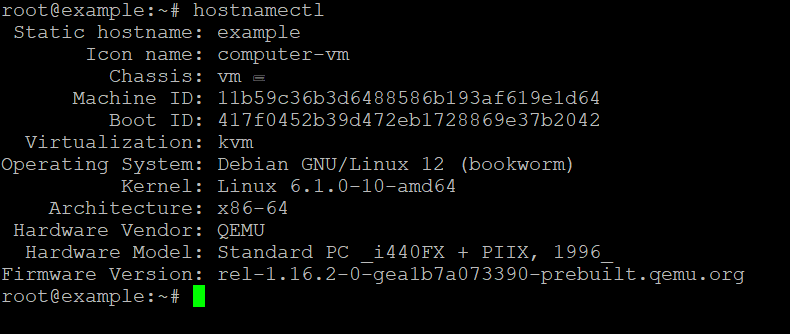
Method 1: Using hostnamectl (systemd-Based Distributions)
This method applies to Ubuntu 16.04+, Debian 8+, CentOS 7+, RHEL 7+, Fedora 15+, AlmaLinux, Rocky Linux, and any distribution running systemd as PID 1.
Step 1: Set the Static Hostname
sudo hostnamectl set-hostname new-static-hostnamehostnamectl writes the value to /etc/hostname, calls the sethostname(2) syscall to update the running kernel immediately, and notifies systemd-hostnamed — all atomically. No reboot is required.
To set all three hostname types simultaneously:
sudo hostnamectl set-hostname "new-static-hostname" --static
sudo hostnamectl set-hostname "New Static Hostname" --pretty
sudo hostnamectl set-hostname "new-static-hostname" --transient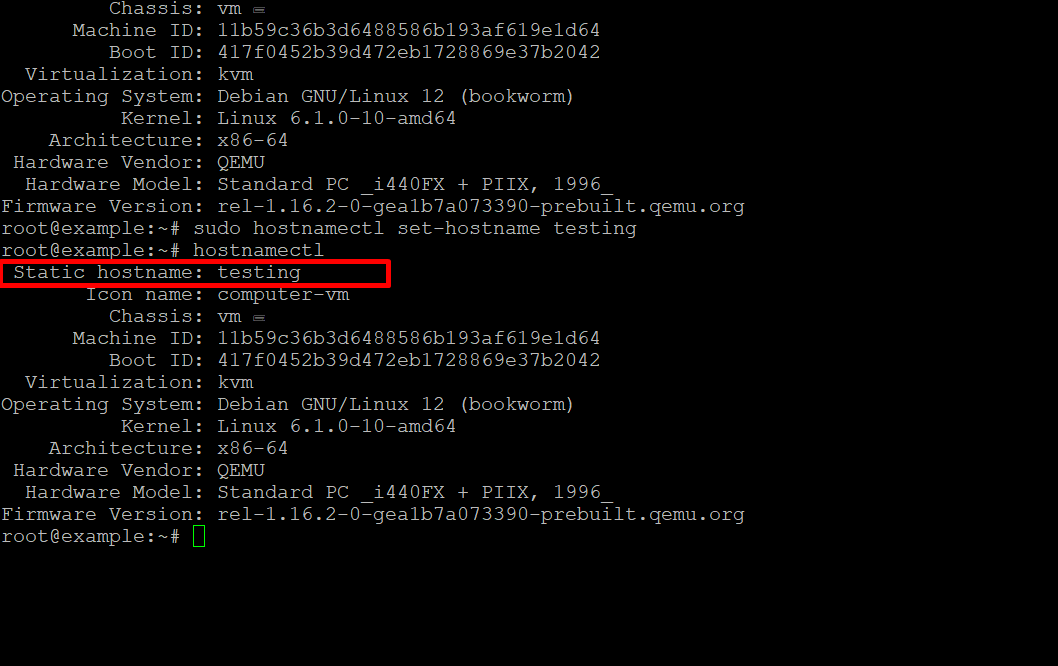
Step 2: Verify the Change
hostnamectlConfirm that the Static hostname field shows your new value. Also verify the kernel has picked it up:
hostnameStep 3: Update /etc/hosts
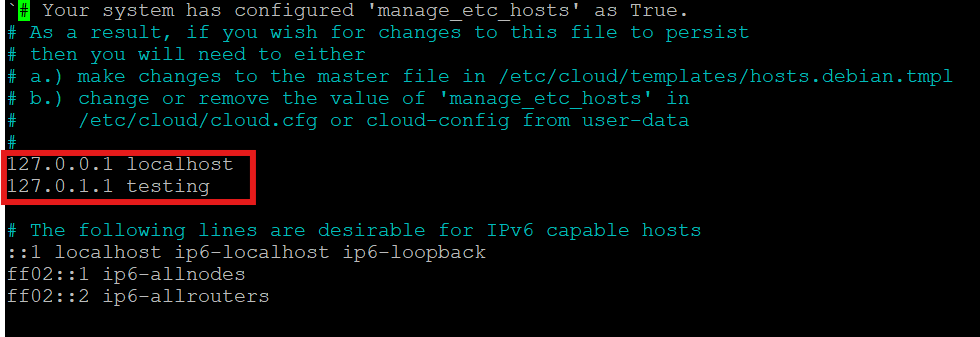
hostnamectl does not update /etc/hosts automatically. Failing to update this file causes sudo to emit the warning unable to resolve host, breaks applications that call gethostbyname() on the local hostname, and can cause Java-based services (Elasticsearch, Kafka) to fail on startup.
sudo nano /etc/hostsThe file should contain at minimum:
127.0.0.1   localhost
127.0.1.1   new-static-hostname.yourdomain.com  new-static-hostname
The second line uses 127.0.1.1 (not 127.0.0.1) for the machine's own hostname on Debian-family systems. On RHEL-family systems, use the actual primary IP address instead:
192.168.1.50 new-static-hostname.yourdomain.com new-static-hostnameIf you are managing a VPS with cPanel, cPanel's hostname change tool handles /etc/hosts automatically, but you should still verify the result manually.
Method 2: Manually Editing /etc/hostname (Non-systemd Distributions)
This method applies to older Debian/Ubuntu releases using SysVinit or Upstart, Alpine Linux, Gentoo with OpenRC, Void Linux, and embedded systems.
Step 1: Edit /etc/hostname
sudo nano /etc/hostnameThe file should contain exactly one line — the short hostname with no trailing whitespace or newline beyond the standard line terminator:
new-static-hostnameStep 2: Update /etc/hosts
sudo nano /etc/hostsApply the same mapping described in Method 1.
Step 3: Apply the Change Without Rebooting
Notify the running kernel of the new hostname immediately:
sudo hostname new-static-hostnameOn systems with systemd-hostnamed available even without full systemd adoption:
sudo systemctl restart systemd-hostnamedOn pure SysVinit systems, the hostname command above is sufficient. The change takes effect for all new processes; existing shells will still show the old prompt until you open a new terminal session or run:
exec bashMethod 3: Cloud-Init Override (Critical for Cloud VPS Instances)
This is the most commonly missed scenario. On cloud platforms — including most VPS providers — cloud-init runs at every boot and resets the hostname to whatever the instance metadata API returns. Your /etc/hostname change will be silently overwritten on the next reboot.
To make a static hostname survive cloud-init, edit /etc/cloud/cloud.cfg:
sudo nano /etc/cloud/cloud.cfgFind or add the following directive:
preserve_hostname: trueAlternatively, create a drop-in override file to avoid modifying the package-managed config:
sudo mkdir -p /etc/cloud/cloud.cfg.d/
sudo tee /etc/cloud/cloud.cfg.d/99_hostname.cfg > /dev/null <<EOF
preserve_hostname: true
EOF
After this change, cloud-init will no longer touch the hostname on subsequent boots.
Preventing DHCP from Overriding the Static Hostname
Even without cloud-init, a DHCP client can overwrite the transient hostname. The fix depends on which DHCP client your distribution uses.
For dhclient (Debian/Ubuntu legacy)
Edit /etc/dhcp/dhclient.conf:
sudo nano /etc/dhcp/dhclient.confAdd or modify:
send host-name "new-static-hostname";
supersede host-name "new-static-hostname";
The supersede directive ensures the client ignores any hostname offered by the DHCP server.
For systemd-networkd with systemd-resolved
Edit or create a .network file in /etc/systemd/network/:
[DHCP]
SendHostname=yes
UseHostname=no
UseHostname=no prevents the DHCP-offered hostname from overwriting the static one.
For NetworkManager (most desktop and modern server distros)
sudo nmcli con modify "connection-name" ipv4.dhcp-hostname "new-static-hostname"
sudo nmcli con modify "connection-name" ipv4.dhcp-send-hostname yes
To prevent NetworkManager from accepting a hostname from DHCP entirely, add to /etc/NetworkManager/NetworkManager.conf:
[main]
hostname-mode=none
Hostname Propagation: What Else Needs to Know
Setting the hostname in the OS is necessary but not sufficient in a networked environment. Consider these downstream systems:
- DNS forward and reverse records: Update your DNS zone's A record and PTR record. Without a matching PTR record, many mail servers will reject outbound email, and some security tools flag the host as suspicious.
- SSL/TLS certificates: If your hostname is part of a certificate's CN or SAN, you need a new certificate. SSL certificates tied to the old hostname will produce validation errors.
- Domain registration and DNS propagation: If the hostname maps to a public FQDN, update the DNS record at your domain registrar and allow for TTL-based propagation time.
- Monitoring agents: Prometheus node exporter, Datadog, Zabbix, and similar agents use the hostname as a label. After a hostname change, historical metrics may appear under a different host identity.
/etc/ssh/ssh_known_hosts: Cluster-wide known-hosts files referencing the old hostname must be updated.- Application configuration files: Any hardcoded hostname in application configs, JDBC connection strings, or message broker advertised listeners must be updated.
Comparison: Hostname Configuration Methods
| Method | Distro Compatibility | Requires Reboot | Handles Cloud-Init | Atomic Update |
|---|---|---|---|---|
hostnamectl set-hostname | systemd distros | No | No (needs preserve_hostname) | Yes |
Edit /etc/hostname manually | All distros | No (with hostname cmd) | No | No |
Cloud-init preserve_hostname | Cloud instances | No | Yes | N/A |
DHCP client config (supersede) | All distros | No | No | No |
NetworkManager nmcli | NM-managed systems | No | No | Yes |
Real-World Edge Cases and Pitfalls
Pitfall 1: The sudo warning loop. If you set the hostname but forget to update /etc/hosts, every sudo invocation will print sudo: unable to resolve host new-static-hostname. This is not fatal, but it adds latency to every privileged command and floods logs.
Pitfall 2: Java services refuse to start. Java's InetAddress.getLocalHost() resolves the hostname via gethostbyname(). If the hostname is not in /etc/hosts or resolvable via DNS, services like Elasticsearch, Kafka, and Cassandra throw UnknownHostException on startup.
Pitfall 3: Hostname with underscores. Despite being widely used informally, underscores in hostnames violate RFC 952 and RFC 1123. Some DNS resolvers, TLS libraries, and Kubernetes components will reject or mishandle them. Always use hyphens.
Pitfall 4: FQDN vs. short hostname. hostnamectl stores only the short hostname (e.g., web01). The FQDN (e.g., web01.example.com) is resolved by combining the short hostname with the domain search list in /etc/resolv.conf or /etc/systemd/resolved.conf. Set Domains=example.com in resolved.conf or search example.com in resolv.conf to make hostname --fqdn return the correct value.
Pitfall 5: Container and namespace isolation. Inside a Docker container or LXC namespace, hostnamectl may fail with Failed to connect to bus: No such file or directory because systemd-hostnamed is not running. Use hostname new-name directly, or set the hostname at container creation time via docker run --hostname or the hostname: key in docker-compose.yml.
Practical Decision Checklist
Use this checklist before and after every hostname change in a production environment:
- Confirm the new hostname is RFC 1123-compliant (lowercase, hyphens only, max 63 chars per label)
- Run
hostnamectlbefore the change and save the output for audit purposes - Set the static hostname with
hostnamectl set-hostnameor by editing/etc/hostname - Update
/etc/hostswith both the short hostname and the FQDN on the same line - If the system is a cloud instance, set
preserve_hostname: truein cloud-init config - If DHCP is active, configure the DHCP client to ignore server-offered hostnames
- Update DNS A and PTR records
- Renew or reissue any TLS certificates that reference the old hostname
- Restart hostname-dependent services (syslog, monitoring agents, Java applications)
- Open a new shell session and verify
hostname,hostname --fqdn, andhostnamectlall return consistent values - Check
/var/log/syslogorjournalctl -bfor any post-change errors referencing the old hostname
FAQ
Does hostnamectl set-hostname require a reboot to take effect?
No. hostnamectl calls the sethostname(2) system call immediately, updating the running kernel in real time. The change is also written to /etc/hostname for persistence. New processes and new shell sessions will see the updated hostname without any reboot.
Why does my hostname revert after every reboot on a cloud VPS?
Cloud-init is almost certainly overwriting it. Add preserve_hostname: true to /etc/cloud/cloud.cfg or create a drop-in file at /etc/cloud/cloud.cfg.d/99_hostname.cfg with the same directive. This is the single most common cause of hostname reversion on cloud-hosted machines.
What is the difference between 127.0.0.1 and 127.0.1.1 in /etc/hosts?
127.0.0.1 is the standard loopback address mapped to localhost. Debian-family distributions use 127.0.1.1 as a secondary loopback address specifically for the machine's own hostname, avoiding conflicts when the machine has no static IP. On RHEL-family systems and machines with a fixed IP, use the actual primary IP address for the hostname mapping instead.
Can I use an underscore in a Linux hostname?
Technically the OS will accept it, but you should not. Underscores violate RFC 952 and RFC 1123. They cause failures in DNS resolution (BIND rejects them by default), TLS certificate validation, and Kubernetes node naming. Use hyphens exclusively.
How do I verify the hostname is fully consistent across all system layers?
Run the following sequence and confirm all outputs match:
hostname
hostname --fqdn
hostnamectl --static
cat /etc/hostname
systemd-resolve --status | grep "Current hostname"
If any of these return different values, one of the layers — cloud-init, DHCP client, or NetworkManager — is still overriding the static setting.