Open Ticket
  +373 79 600002
  Telegram Live Chat
  F.A.Q
F.A.Q  English
 Русский
  Română
  Deutsch
  Français
  Türkçe
  Español
  Português
  Українська
  български
  Polski
  Indonesia
  中文 (中国)






































































































































 on All Hosting Services






Mastering File Management in Linux Command Line
Efficient file management on a Linux server is crucial for system administrators and developers alike. Utilizing command-line tools such as `cat`, `less`, and `tail` can significantly enhance your ability to view and manipulate file contents directly from the terminal. This guide provides an in-depth look at these essential commands, particularly in the context of using a Linux VPS hosted by AlexHost.
Overview of Essential Commands
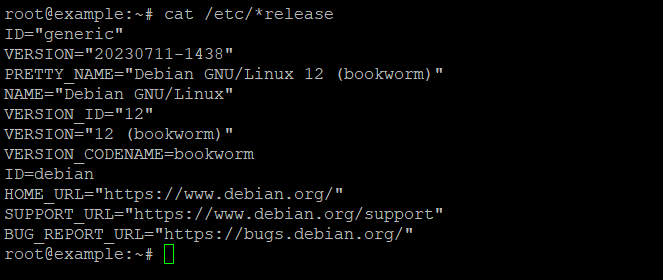
`cat`: Concatenate and Display File Contents
The `cat` command is a versatile tool used to display the contents of text files directly in the terminal. Its name is derived from "concatenate," highlighting its ability to combine multiple files into a single stream. This command is particularly useful for quickly displaying the contents of configuration files or combining multiple files for output. For example:
“`bash
cat /etc/*release
“`
This command outputs the operating system's version and detailed release information. The `cat` command is efficient for quick file dumps and is a staple in any Linux user's toolkit.
`less`: View Files One Page at a Time
The `less` command provides a more interactive way to view large text files, allowing you to scroll through content one page at a time. Unlike `cat`, `less` does not load the entire file into memory, making it ideal for large files. It supports various navigation operations, such as searching within the file and moving forward and backward through the content. This makes `less` indispensable for examining lengthy log files or configuration documents.
`tail`: Monitor File Changes in Real Time
The `tail` command is designed to display the last few lines of a file. It is particularly useful for monitoring log files, as it can track new entries in real time. The `-f` option allows `tail` to follow a file, updating the display as new lines are added. For instance, to view the last 100 lines of a log file and monitor it for changes, you would use:
“`bash
tail -n 100 -f your_filename.txt
“`
This real-time monitoring capability is crucial for debugging applications and observing system logs.
Practical Applications on AlexHost
When using a Linux VPS from AlexHost, these tools become even more powerful thanks to the platform's fast SSDs and full root access. Whether you're managing server configurations, debugging web applications, or monitoring system performance, mastering these commands will streamline your workflow.
- VPS Hosting: Explore VPS Hosting
- Dedicated Servers: Discover Dedicated Servers
- Shared Web Hosting: Learn About Shared Hosting
Key Takeaway Checklist
- Use `cat` for quick file content dumps and concatenation.
- Leverage `less` for navigating large files without loading them entirely into memory.
- Employ `tail -f` for real-time log monitoring and debugging.
- Optimize your workflow with AlexHost's fast SSDs and root access for seamless file management.
FAQ
What is the primary use of the `cat` command in Linux?
The `cat` command is primarily used for displaying the contents of text files and concatenating multiple files into a single output stream.
How can I view large log files efficiently?
Use the `less` command to view large log files efficiently, as it allows you to scroll through content one page at a time without loading the entire file into memory.
How do I monitor a log file in real time?
Utilize the `tail -f` command to monitor a log file in real time, which updates the display as new lines are added to the file.
Why is `less` preferred over `cat` for large files?
`Less` is preferred because it does not load the entire file into memory, making it more efficient for navigating large files.
How can AlexHost enhance my file management experience?
AlexHost's fast SSDs and full root access provide an optimal environment for efficient file management using command-line tools like `cat`, `less`, and `tail`.