Open Ticket
  +373 79 600002
  Telegram Live Chat
  F.A.Q
F.A.Q  English
 Русский
  Română
  Deutsch
  Français
  Türkçe
  Español
  Português
  Українська
  български
  Polski
  Indonesia
  中文 (中国)






































































































































 on All Hosting Services






What Is Email Hosting? How It Works, Why It Matters, and When You Need It
From Inbox to Identity: The Role of Email Hosting

An invoice from billing@yourcompany.com feels normal. An invoice from yourcompanyhelp123@gmail.com feels like something you pause over. The difference is not just cosmetic. It signals trust, ownership, and whether the business behind the message looks established enough to take seriously.
That is why email changes the moment it represents a business, a team, or even a serious side project. At that point, email is no longer just an app. It becomes part of your communication infrastructure. The service behind the address affects routing, security, account control, and how legitimate your messages appear.
This article explains what email hosting is, how it works with your domain, how it differs from adjacent services, which hosting models exist, and when professional email is worth caring about.
Keywords
If several terms in this article sound similar, that is normal. This quick glossary covers the words and phrases most likely to cause confusion before the deeper explanation begins.
| Keyword | Brief explanation |
|---|---|
| 🌐 Domain | The name layer behind an address like yourcompany.com. |
| 📬 Email hosting | The service that runs mailboxes on your domain. |
| 🖥️ Email client or webmail | The interface you open to read and send mail. |
| ↪️ Email forwarding | Sending mail from one address into another inbox without creating a full mailbox on the domain. |
| 🏷️ Alias | An extra address that points to an existing mailbox instead of being a separate mailbox by itself. |
| 👥 Role address | A function-based address such as support@yourcompany.com or sales@yourcompany.com. |
| 🌍 DNS | The record system for a domain that tells the internet where different services for that domain should go. |
| 📮 MX records | DNS records that tell other mail systems which service should receive incoming mail for the domain. |
| 🖧 Mail server | The system that sends, receives, filters, and stores email. |
| 📤 SMTP | The sending side of email. |
| 📥 IMAP | A mail access method that syncs messages between the mailbox and the app you use to read them. |
| 📦 POP3 | A mail access method for retrieving messages, often with less syncing behavior than IMAP. |
| 🛡️ SPF | A record that lists which servers are allowed to send mail for your domain. |
| ✍️ DKIM | A digital signature that helps receiving servers verify that a message is legitimate and was not altered in transit. |
| 🚨 DMARC | A policy that tells receiving servers what to do with suspicious mail that claims to be from your domain. |
| 🧭 DNS management | The control layer where you manage the records that point your domain to services such as websites or email. |
| 🔄 Reverse DNS | A record that maps a server IP address back to a domain name and is often part of trusted mail delivery. |
| 🖥️ VPS | A virtual private server that some people use when they want to self-host email infrastructure. |
What Email Hosting Actually Is — and What It Isn’t
Email hosting is the service that runs mailboxes on your domain. If you want addresses like sales@yourcompany.com, support@yourcompany.com, or jobs@yourcompany.com, email hosting is the layer that sends, receives, stores, and administers those messages. Your domain gives you the name. Email hosting makes that name function as a real mailbox system.

A useful way to picture it is as a mailroom for your domain. The domain is the street address on the building. The email hosting service is the staffed mailroom inside it — the part that accepts incoming mail, routes outgoing messages, stores what arrives, and applies rules around access, spam filtering, and account management. Without the mailroom, the address exists, but mail is not being properly handled.
| Layer | What it is | What it does not replace |
|---|---|---|
| Domain | Your address on the internet, such as yourcompany.com | A mailbox service by itself |
| Email hosting | The service that sends, receives, stores, and manages mail on that domain | The app you use to read mail |
| Email client or webmail | The interface you open, such as Gmail, Outlook, Apple Mail, or Thunderbird | The infrastructure behind the mailbox |
| Bulk email platform | A service for marketing campaigns or transactional sending at scale | A normal day-to-day business mailbox system |
📝 Note: Email forwarding is not the same as full email hosting. Forwarding can send messages from info@yourcompany.com into a Gmail inbox, but it does not create a true mailbox on your domain with storage, admin controls, security policies, and its own managed sending environment.
Gmail and Outlook are good examples of why this topic gets confusing. People often use those names to mean “email service” in general, but they can describe different layers. Gmail can mean a free personal mailbox, or it can be the interface for a Google Workspace account on a custom domain. Outlook can be the app, the interface, or part of a hosted Microsoft 365 setup. The inbox you open is not always the same thing as the hosting behind it. The same distinction explains aliases and role addresses like hello@yourcompany.com or support@yourcompany.com: they depend on a managed mail system, not just a purchased domain.
How Email Hosting Works at a High Level
Once the definition is clear, the mechanics become much less intimidating. At a high level, email hosting works by connecting your domain to a mail service through DNS records. The simplest mental model is still postal: your domain is the address, DNS tells the internet where to send the mail, the mail server acts like the post office or mailroom, and your inbox app is the place where you read what arrived.
Mail flow at a glance: domain → DNS/MX records → mail service/server → webmail or email client
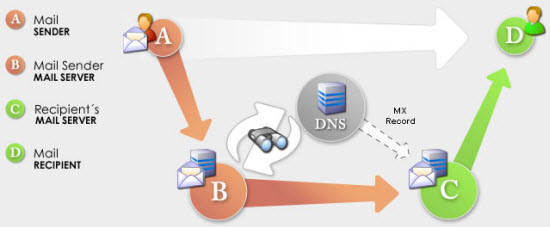
- Your domain creates the email identity. It is the naming layer behind addresses like name@yourcompany.com.
- DNS, especially MX records, routes mail. MX records tell the internet which service should receive incoming mail for that domain.
- The mail service or server does the real work. It handles sending, receiving, filtering, and storing messages.
- Users access the mailbox through software. That might be webmail, or an email client such as Gmail, Outlook, Apple Mail, or Thunderbird.
MX records sound technical, but the job is simple: they are routing instructions. When someone sends a message to you@yourcompany.com, other mail systems look up the domain’s MX records to find out which service is responsible for accepting that mail. That is why email hosting is tied so closely to domain control. The mailbox depends on the address layer knowing where to deliver messages.
You will also see a few protocol names around this stack. SMTP is the sending side. IMAP and POP3 are access methods, meaning the ways an inbox app can retrieve or sync stored mail. You do not need to memorize them to understand the bigger point: the client is only the access layer. The host is the service behind it. That is also why moving email to a different host usually does not move your website. Website hosting and email routing can live on different services because they rely on different records and services.
Why Email Hosting Matters in Real Life

Once those pieces are separated, the reason email hosting matters becomes much more concrete. This is not only about looking polished. It affects trust, inbox placement, account security, and whether a growing team can communicate without improvising everything from a founder’s personal inbox.
Credibility and brand trust
A message from name@yourcompany.com tells the recipient that the business owns its identity and expects to be reached through it. That matters for invoices, proposals, hiring, vendor conversations, and customer support. A free address is not automatically suspicious, but it can make a business look temporary, fragmented, or harder to verify. Professional email works like business stationery in digital form: it signals continuity.
Deliverability and sender reputation
Modern email is filtered long before a human sees it. Inbox providers pay attention to authentication, server reputation, and sending behavior, which means a branded address alone does not guarantee inbox placement. Services such as Gmail increasingly expect authenticated mail for reliable delivery, especially when businesses send invoices, account notifications, or customer updates. Good email hosting helps because it gives you a place to manage that trust layer deliberately.
📝 Note: A custom-domain address helps with trust, but it does not guarantee inbox delivery by itself. Mail still has to be authenticated and sent from a service with a solid reputation.
Security and control
Business email carries contracts, password resets, invoices, support threads, and internal discussion. That makes spam filtering, account recovery, multi-factor authentication, malware screening, and domain-level protections part of the job. With proper email hosting, you get admin control over who has access, how accounts are secured, and what happens when someone joins or leaves the team. That is very different from depending on a patchwork of personal inboxes.
Team operations and growth
The operational side becomes obvious as soon as more than one person is involved. support@yourcompany.com, billing@yourcompany.com, and careers@yourcompany.com are not just nicer-looking addresses. They are workflow tools. They let teams share inbox responsibility, create aliases, onboard and offboard staff cleanly, and keep communication tied to the business rather than to whoever happened to set up the first account. That is where email hosting stops feeling cosmetic and starts behaving like infrastructure.
Email Hosting vs Free Email, Web Hosting, and Domain Management

People often bundle all of this together under “website stuff,” but the services around a domain do different jobs. Email hosting sits next to free email, web hosting, and domain management, yet it does not replace any of them.
| Service | What it controls | What it does not replace | Best fit |
|---|---|---|---|
| Free email | A personal mailbox on the provider’s domain | Your own branded business identity | Personal use |
| Email hosting | Mailboxes, mail routing, storage, admin controls, domain-based email identity | Website hosting, domain registration, bulk campaigns | Professional or project email |
| Web hosting | Website files, apps, databases, web traffic | Mailboxes and mail delivery | Sites and applications |
| Domain registration / DNS management | The name layer and record control for a domain | A working mailbox service | Owning and directing the domain |
Free email is built around convenience and provider-owned identity. That is perfect for personal use. Email hosting is about custom-domain identity, mailbox control, and business continuity. The key difference is not that one sends messages and the other does not. The difference is who owns the naming layer and how professionally the mailbox system is managed.
Web hosting is separate again. It runs website files, applications, and databases. Email hosting runs mailboxes and mail delivery. Many companies sell both in the same package, and entry-level shared hosting often includes basic email accounts. That bundling is convenient, but it does not mean the website and the mail system are the same service. They are adjacent products solving different problems.
Domain registration and DNS management sit one layer earlier. Buying a domain gives you the name. DNS management lets you point different parts of that name to different services. Email hosting uses that control so mail for the domain knows where to go. This is the practical takeaway many readers need most: changing your email host usually means updating mail-related DNS records, not moving your website files.
The Main Types of Email Hosting

Once the boundaries are clear, the market becomes easier to read. Most email hosting choices fall into three broad models. The real difference is how much control you want, how much responsibility you want, and how complex your communication needs are.
Bundled email with web hosting
This is the entry-level model many small sites start with. You buy hosting for a website, and the provider includes basic branded mailboxes in the same account or dashboard. It is often enough for a few custom-domain addresses and light business use. The trade-off is that collaboration features, admin depth, and premium deliverability tooling are usually lighter than in dedicated business email platforms.
Dedicated hosted business email suites
This is the Google Workspace or Microsoft 365 style of setup. The email system is the product, not a side feature. That usually means cleaner administration, stronger security options, better client compatibility, shared tools for teams, and a smoother path as the company grows. For many businesses, this is the default middle ground: less operational burden than self-hosting, more depth than a basic bundled mailbox.
Self-hosted email on VPS or dedicated infrastructure
Some users want maximum control, tighter provider choice, specific privacy preferences, or the ability to run mail on their own VPS or dedicated server. That path is real, but it is also where email becomes much harder than it looks. Running the server software is only part of the job. You also inherit updates, spam control, backups, authentication, reverse DNS, uptime, and sending reputation. “More control” should be read as “more responsibility,” not automatically “better.”
Warning: Self-hosted email is an ongoing operations task. The hard part is not opening a mailbox in a web interface. The hard part is keeping the service secure, trusted, well-configured, and deliverable over time.
| Model | Good fit | Main trade-off | Who it suits |
|---|---|---|---|
| Bundled hosting email | A site that needs a few branded inboxes | Fewer advanced admin and collaboration features | Small sites, early-stage projects |
| Dedicated business email suite | Teams that want managed security and smoother administration | Ongoing subscription cost and less low-level control | Most established businesses and growing teams |
| Self-hosted mail | Custom infrastructure, privacy preferences, or special control requirements | High maintenance and deliverability burden | Experienced infrastructure-minded users |
This is one reason some providers, including AlexHost, span more than one layer. A business might start with basic hosting email, then move to standalone email hosting or later to VPS or dedicated infrastructure. Choose the model that matches your communication risk and operational capacity now, not the one that sounds most powerful.
Who Actually Needs Email Hosting — and When It May Be Overkill

Not everyone needs full business email on day one. If you are a freelancer, consultant, solo founder, or small shop dealing with proposals, invoices, or client communication, branded email starts paying off early because trust matters as soon as money, deadlines, or reputation are involved. A custom-domain inbox tells clients they are dealing with a real business identity, not a side account that may disappear with one person.
For small businesses, agencies, and growing teams, the need becomes less optional. Multiple inboxes, role addresses, shared access, onboarding and offboarding, and clearer ownership of customer conversations all become operational requirements. Once more than one person needs to answer support, billing, or sales messages, personal inbox improvisation stops scaling.
There is also a different kind of reader who cares for technical or privacy reasons. Some want more control over where mail lives or want to avoid tying business identity to a personal mailbox. Some are interested in self-hosting because they already manage infrastructure. Those are valid reasons, but they do not automatically mean full self-hosting is necessary. In many cases, a good hosted provider is enough. By contrast, a hobby project, temporary landing page, or simple forwarding setup may not need full hosting yet.
Tip: Quick decision checklist
- Need it now: You send invoices, proposals, support replies, hiring emails, or team communication from your domain.
- Need it later: The project is real, but still one-person, low-volume, and not yet using role addresses or shared inboxes.
- Maybe not yet: It is a hobby site, a temporary page, or forwarding is enough for the near term.
As a rule of thumb, email hosting becomes worth it when you need support@, sales@, shared access, cleaner onboarding and offboarding, or stronger sender trust. If you do not need those things yet, a lighter setup may be perfectly reasonable. The goal is not to look enterprise from day one. The goal is to match the infrastructure to the stage of the project.
What to Look For in an Email Hosting Service

Once you know you probably need email hosting, the evaluation criteria get sharper. The right service is not the one with the biggest storage quota or lowest price. It is the one that fits your communication risk, growth path, and operational appetite.
Deliverability and reputation
The provider should make authentication straightforward and support the standards modern inbox providers expect. In plain language, SPF is your approved sender list, DKIM is your digital signature, and DMARC is the policy for suspicious mail. You also want strong spam filtering and a provider that treats sender reputation as part of the product, not something you discover only after an invoice or support reply goes missing.
Security and resilience
Look for multi-factor authentication, malware and spam protection, secure transport, backup options, and a sensible recovery process. Email contains too much business context to treat security as optional. A service that makes account ownership, password recovery, and mailbox recovery clear is doing more than adding features. It is reducing operational risk.
Admin control and scalability
This is where everyday usefulness shows up. Can you create aliases and role addresses easily? Does the service support shared mailboxes, user management, storage limits, and clean account handoffs when staff changes? Does it work well with mobile apps and desktop clients? Large storage can be helpful, but it is rarely the only reason a service succeeds or fails in real business use.
Support and ease of management
Good support matters more than many buyers think, especially during DNS changes, migrations, or first-time setup. Clear documentation, migration help, responsive support, and a clean admin interface save time precisely when the stakes are highest. Your shortlist should reflect team size, mail volume, and how much responsibility you truly want to own. If you want simplicity, buy simplicity. If you want control, be ready to operate it.
Common Misconceptions About Email Hosting

By this point, most of the confusion around email hosting comes down to a few repeated myths. Each one contains part of the truth. The problem is that the missing half leads people to buy the wrong service or expect the wrong outcome.
- Myth: A custom email address automatically guarantees inbox delivery.
Reality: It improves trust, but inbox placement still depends on authentication, sender reputation, and sending behavior. - Myth: Buying a domain means you bought email hosting.
Reality: The domain is the name layer. Email hosting is the service that turns that name into working mailboxes. - Myth: Self-hosting is automatically cheaper, easier, or more private.
Reality: It gives you control, but it also gives you the ongoing burden of maintenance, reputation, spam handling, and security. - Myth: Web hosting and email hosting are the same thing.
Reality: They are often sold together, but they remain separate functions with separate infrastructure behind them.
Once you separate identity from deliverability, domains from mailboxes, and control from simplicity, the category becomes much easier to judge. Email hosting is not mainly an interface choice. It is an infrastructure choice.
FAQ

- Is email hosting the same as buying a domain?
- No. A domain gives you the address name, while email hosting runs the mailboxes and routing that make addresses on that domain usable.
- Does web hosting include email hosting?
- Sometimes, especially on shared hosting plans. But even when a provider bundles them together, web hosting and email hosting are still different services.
- Can I use Gmail or Outlook with my own domain?
- Yes. Gmail and Outlook can be the interface for business email on a custom domain, depending on the hosted service behind the mailbox.
- Will moving email hosting break my website?
- Usually no. In most cases you change mail-related DNS records, not website files or web server settings.
- Is self-hosting email worth it for a small business?
- Usually only if the business specifically needs that level of control and has the time or expertise to operate it. For most small teams, a managed service is the safer and simpler choice.
Email Hosting Is Part of Your Communication Infrastructure

The difference between billing@yourcompany.com and yourcompanyhelp123@gmail.com is no longer just visual once you understand the infrastructure behind it. One points to a business identity that owns its communication layer. The other may still work, but it leaves more trust, control, and continuity outside the business itself. If customers, clients, or partners use email to judge and reach your project, email hosting matters for the same reason your domain and site hosting matter: it is part of how the business shows up.
The practical next step is not to buy the most complex setup available. It is to choose the simplest hosting model that gives you the credibility, control, and reliability you actually need right now. If you want those layers to grow in one place, it can make sense to look at providers such as AlexHost that offer shared hosting, email hosting, and higher-control VPS or dedicated options in the same ecosystem.